
LedgerWelcome offer
Up to $20 in Bitcoin with your Ledger
Shop through this partner link to get up to $20 in Bitcoin with your Ledger.
Affiliate link. We may earn a commission, at no extra cost to you.
At a glance
- What changed
- Ledger's Security Key app makes a Ledger signer a hardware second factor for sites such as Gmail, GitHub and Coinbase.
- Who it affects
- Ledger owners with a supported device and a site that accepts security keys.
- When
- Promoted by Ledger on 27 October 2026; the app and its guide were already available.
What Ledger said
Ledger opened a nine-post thread on its official X account on 27 October 2026 with a simple warning: whoever controls your email controls password resets, exchange logins and recovery codes. Its answer is the Security Key app, which turns a Ledger signer into a hardware key for Gmail, GitHub, Coinbase and more.
The thread says the app works today as a second factor with Gmail, GitHub, Okta, 1Password, Coinbase and X. Ledger argues that SMS codes can be lost to a SIM swap and authenticator codes can be phished, while a hardware key only answers the real site, so a fake login page gets nothing. It adds that on exchanges such as Coinbase the key can guard both the login and external transfers, and that the device's own screen shows which site you are signing in to before you confirm.
Which devices and browsers work
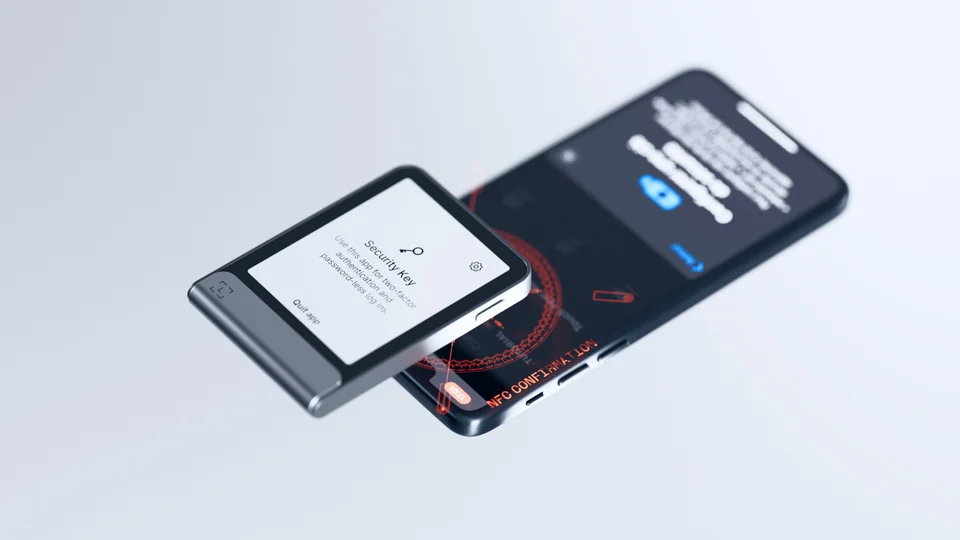
Ledger's setup guide lists six devices: Nano S Plus (OS 1.1.0 or later), Nano X (OS 2.1.0 or later), Nano S (OS 2.1.0 or later), Nano Gen5, Stax and Flex. The app does not use Bluetooth, so most devices connect by cable. Stax, Flex and Nano Gen5 can instead be tapped against a phone with NFC, which the thread presents as PIN, tap, done.
On the browser side, the guide marks Chrome, Safari and Firefox as compatible on macOS and iOS, Chrome, Edge and Firefox on Windows, and Chrome and Firefox on Linux. On Android only Chrome is listed, on Android 14 with the March 2024 Google Play system update or later. Nano S, Nano S Plus and Nano X owners cannot use the app on an iPhone at all, because those devices cannot connect to one for this app.
Recovery and the limits to know
Ledger's main selling point is recovery. Most hardware keys, the thread says, leave you recovering every account by hand if you lose them. With a Ledger, the guide explains, the credentials are derived from your seed, so a device set up with the same 24 words signs in to the same sites again, and the thread adds Ledger's backup service and a second device on the same seed as routes back.
There are two catches in the guide. Resident keys are not supported yet, and recovery from the seed does not cover them, which is why the app does not work everywhere that offers passkeys. And credentials created with Ledger's older FIDO U2F app do not carry over: you need to register the device again as a new security key.
How to set it up
For existing owners, Ledger's thread gives three steps: open Ledger Wallet, install the Security Key app from My Ledger, then add it as a security key in your account settings, starting with Gmail. Ledger's guide also lists OKX and Kraken among compatible exchanges and Google, Login.gov and X among services.
Before you switch your logins
A hardware key protects the account only if weaker sign-in options are not left as an easy way around it, so check which fallback methods each service still allows. Keep your recovery phrase offline and private: since the login credentials come from the same seed, anyone with those 24 words could recreate them as well as reach your crypto.
LedgerWelcome offer
Up to $20 in Bitcoin with your Ledger
Shop through this partner link to get up to $20 in Bitcoin with your Ledger.
Affiliate link. We may earn a commission, at no extra cost to you.
Conditions
No code needed. The guide describes a post-purchase voucher; confirm eligibility and the current offer at checkout.
The partner link has no expiry. Campaign dates, benefits and eligibility are separate and may change. Check the provider’s current terms before signing up.