TrezorPartner offer
Open-source hardware wallets
Shop through this partner link to get open-source hardware wallets.
Affiliate link. We may earn a commission, at no extra cost to you.
At a glance
- What changed
- Trezor's Clear Signing now decodes transactions for Sky Money, Kyber Network and Hyperliquid's HyperEVM, and covers more of Lido, Threshold, QuickSwap, Bedrock, Figment, Tally, Celo, Flare and Tesseract.
- Who it affects
- Owners of a Trezor Model T, Safe 3, Safe 5 or Safe 7 who use these apps and networks through Trezor Suite, WalletConnect or a wallet built on Trezor Connect.
- When
- Announced on Trezor's official X account at 17:30 UTC on Monday 9 November 2026 (18:30 in Amsterdam).
Add Exchange.news as a preferred source on Google
What Trezor announced
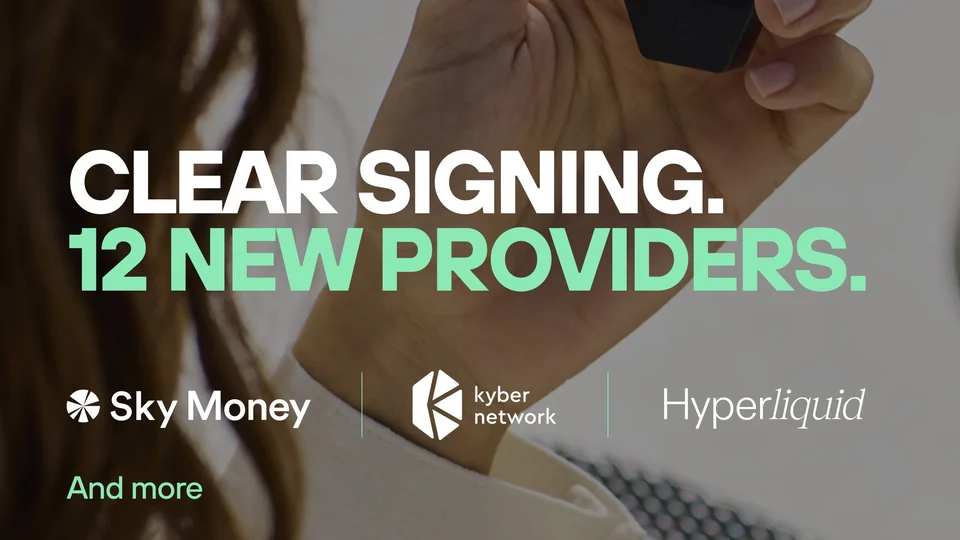
Trezor said on its official X account at 17:30 UTC on Monday 9 November 2026 (18:30 in Amsterdam) that Trezor hardware wallets now clear-sign transactions on Sky Money, Kyber Network and HyperEVM, the smart contract layer of Hyperliquid. The same post lists extended coverage for nine more projects: Lido, Threshold, QuickSwap, Bedrock, Figment, Tally, Celo, Flare and Tesseract. The artwork attached to the post sums the update up as "Clear Signing. 12 new providers."
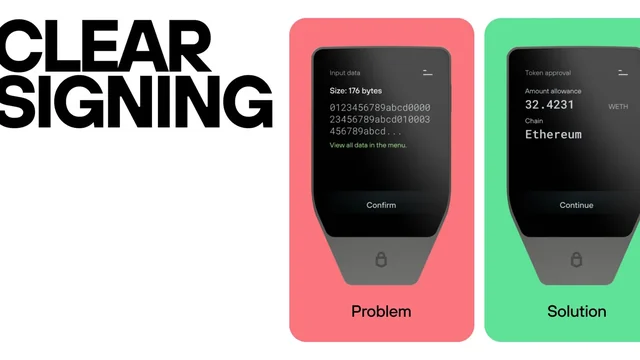
In practice, when you approve a supported transaction with one of these apps, the Trezor screen should show what the transaction does, which tokens are involved and how much, instead of a block of raw data. Trezor stresses that every integration is built on ERC-7730, an open standard, and runs inside its open-source firmware, so the decoding can be inspected rather than taken on trust.
How Clear Signing works on a Trezor
When a wallet talks to a smart contract, it sends encoded calldata, not a sentence like "swap 1,000 USDC for ETH". Without Clear Signing, a hardware wallet can only show a hash or a "Data Present" notice, so the user has to trust the description on the computer screen, which is the part malware or a fake website can change. This is called blind signing.
Trezor's support guide explains that with Clear Signing the device decodes the calldata itself and shows the requested action, the tokens with correct decimals and the destination or counterparty address on its own screen. Each contract needs a published ERC-7730 descriptor in the registry; if there is none, the Trezor falls back to the usual hash and blind-signing warning. Seeing both kinds of prompts in one session is normal, Trezor says.
According to the same guide, Clear Signing works the same way through Trezor Suite, through WalletConnect and through third-party wallets that use Trezor Connect. It needs a Trezor Model T, Safe 3, Safe 5 or Safe 7 running Universal firmware 2.12.4 or later. The new provider list was not tied to a specific firmware version in Trezor's post, so keeping the device updated is the safe assumption.
What the HyperEVM part covers
The Hyperliquid item is specifically HyperEVM. Trezor's own HyperEVM guide explains that Hyperliquid has two engines: HyperCore, which runs the order book, perpetuals, spot markets and staking, and HyperEVM, which runs Ethereum-compatible smart contracts. Trezor Suite supports HyperEVM but not HyperCore, and HYPE held on HyperCore does not appear in Suite until it is moved to HyperEVM.
The same guide notes that Blockaid transaction simulation, which Trezor Suite offers on other EVM networks, is not available on HyperEVM, and that Safety Checks should stay on Strict now that Suite supports HyperEVM directly. That makes the readable screen on the device more important for HyperEVM apps, because it is one of the checks that remains.
What Trezor did not say
Trezor's post does not list which contracts or actions are covered for each project, or what "extended coverage" adds for Lido and the other eight names compared with before. It also does not give a firmware or Suite release number for the update. If a transaction from one of these apps still shows a hash and a warning, that contract is most likely not in the registry yet.
Our take
Clear Signing is only as useful as its coverage, and adding 12 names, including HyperEVM where Trezor Suite has no transaction simulation, closes some real gaps. The habit stays the same: read the action, token and amount on the Trezor screen, and stop if they do not match what you meant to do. Trezor launched the feature in September; our earlier coverage of that launch and of the rebuilt Trade section in Trezor Suite is linked below.

PhantomPartner offer
10% of trading fees back for 3 months
Phantom referral code: findcodes. Sign up with this code to get 10% of trading fees back for 3 months.
Affiliate link. We may earn a commission, at no extra cost to you.
Conditions
New users who sign up in the Phantom mobile app with this code get 10% of their own eligible trading fees back for three months from signup. Codes apply only at mobile-app signup and cannot be added later. Rebates are paid in CASH to the Phantom Cash balance after a $1 minimum; ID verification may be required. Perps and prediction markets are not available in every region; program terms apply and Phantom may change rates or end the program. Perps are unavailable in the US, UK and US-sanctioned jurisdictions; prediction markets are unavailable in the US, UK, Germany and sanctioned jurisdictions. Program eligibility depends on jurisdiction under the referral terms.
The code and partner link have no expiry. Campaign dates, benefits and eligibility are separate and may change. Check the provider’s current terms before signing up.
 Ledger