At a glance
- What changed
- Swap previews expanded.
- Who it affects
- Suite desktop users.
- When
- September 16 release.
Trezor partner offer and conditions ↓
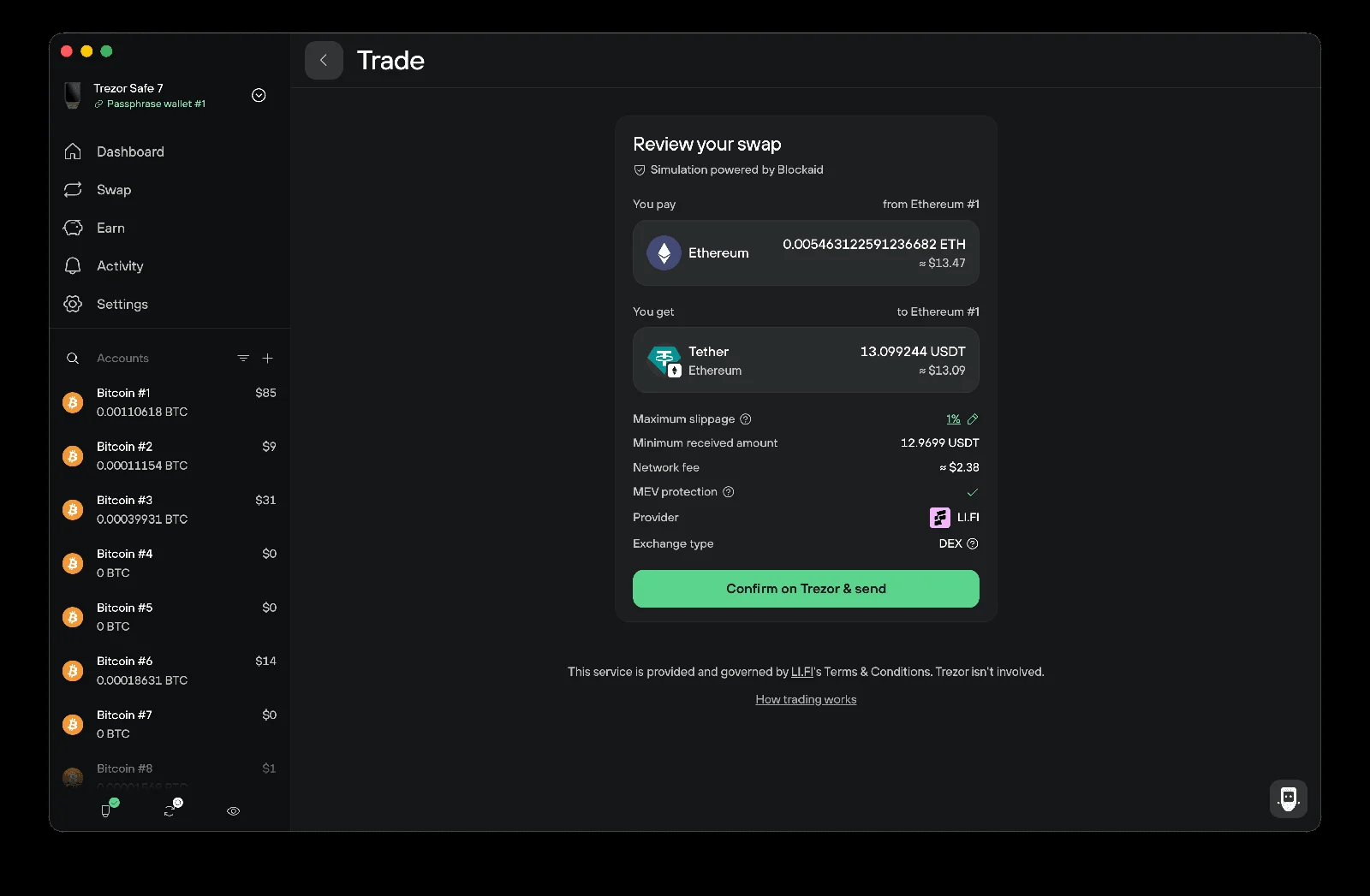
Trezor adds a simulation to swap confirmation
Trezor Suite’s September desktop release, version 26.9.2, adds transaction simulation to the swap confirmation page. Its release notes also extend Blockaid simulation to Solana, Tron and Stellar. The practical purpose of a preview is to help the user examine an intended action before signing; it should not be confused with a receipt proving that the action has already completed.
[1]The app and device have separate release numbers
Trezor’s official forum post dates the release announcement to September 16 and lists firmware 2.12.5 for Model T, Safe 3, Safe 5 and Safe 7. Firmware changes include additional transaction details in several signing flows and specific fixes. The same post notes that Suite updates roll out in stages, so the update prompt may not appear immediately.
This is why a report of “the September update” needs a little more detail. The desktop application version and the firmware version describe different pieces of software. A person troubleshooting a displayed transaction can record both, together with the device model and network, instead of assuming that updating one automatically identifies the version of the other.
[2]Read a preview against a written intention
Imagine a fictional swap in which Leo wants to exchange 100 units of Asset A for Asset B. Before opening the confirmation screen, Leo can state the intended action in one sentence, including the asset being spent, the asset expected and the selected account. That sentence becomes the reference for reading the preview.
If the preview describes a different asset, an unexpected outgoing amount or another account, the discrepancy is a reason to stop and investigate. If it matches, Leo still needs to review the actual confirmation and terms presented in the workflow. A matching preview is useful information, but it does not turn the future result into a completed fact.
The example is an editorial reading exercise, not a description of a particular swap quote or a claim that every network produces identical simulation fields. It deliberately avoids supplying a supposed output amount. That number belongs to the actual offer and transaction being reviewed, not to a generic news article.
Keep prediction, approval and result as three records
A useful way to avoid confusion is to distinguish what was expected, what was authorised and what later happened. In an illustrative transaction log, those can be three short entries: the preview seen before approval, the action confirmed on the device and the resulting transaction status or receipt. Each answers a different question.
Suppose a user saves only the preview and later asks whether the transfer completed. That image may show what was anticipated, but it is not the final result. Conversely, a final transaction record may establish that something happened without explaining what the user thought they were approving. Keeping the stages distinct makes support enquiries and personal reconciliation clearer.
This does not require a complex tracking system. A few non-sensitive notes and the relevant transaction reference can be enough. The aim is to preserve the evidence appropriate to each stage, especially when a person changes an amount or chooses another offer before the final confirmation.
Evaluate the change with a familiar task
Our suggested first review is a task the reader already understands. Note the versions, choose the intended account and inspect what the new screen adds to the explanation. A familiar task makes it easier to notice whether the presentation answers a real question or introduces an unfamiliar term that needs clarification.
If something looks inconsistent, a useful report names the network, task and screen where the discrepancy appeared. It should avoid assuming the simulation engine is wrong merely because the result differs from an expectation that may itself be incomplete. The next step is to compare the inputs and stated conditions.
The broader value of the release is better information at the point of decision. A preview is most helpful when it encourages a deliberate comparison with the person’s intention. It becomes less helpful if it is treated as a green light that replaces reading the transaction. The update gives readers another chance to understand an action before committing to it, while the final transaction record remains the evidence of what actually occurred.
Separate simulation from firmware updates
Choose the change you want to understand.
| Case | What it means |
|---|---|
| Previewing a swap | Inspect the simulated result Suite adds a simulation on the swap confirmation page. |
| Updating hardware | Check the firmware separately The associated firmware release has its own version and device scope. |
Based on the official announcement; availability may change. [1]
- Desktop 26.9.2.
- Firmware 2.12.5 separately.
- Staged app rollout.
Official sources & further reading
Independently written from the primary sources below. Checked on 26 September 2026.
- Trezor Suite update September 2026 ↗Announcement · 16 September 2026
- September Suite and firmware release announcement ↗Announcement · 16 September 2026
Open-source hardware wallets
No public discount code is attached. Any store promotion has its own terms.
Permanent partner link. Campaign dates and benefits are separate.
We may earn a commission, at no extra cost to you. Account and country conditions apply.