At a glance
- What changed
- Additional pricing data.
- Who it affects
- Bond researchers.
- When
- Announced 14 October 2026.
TradingView welcome offer and conditions ↓
Live quotes add another view of bond prices
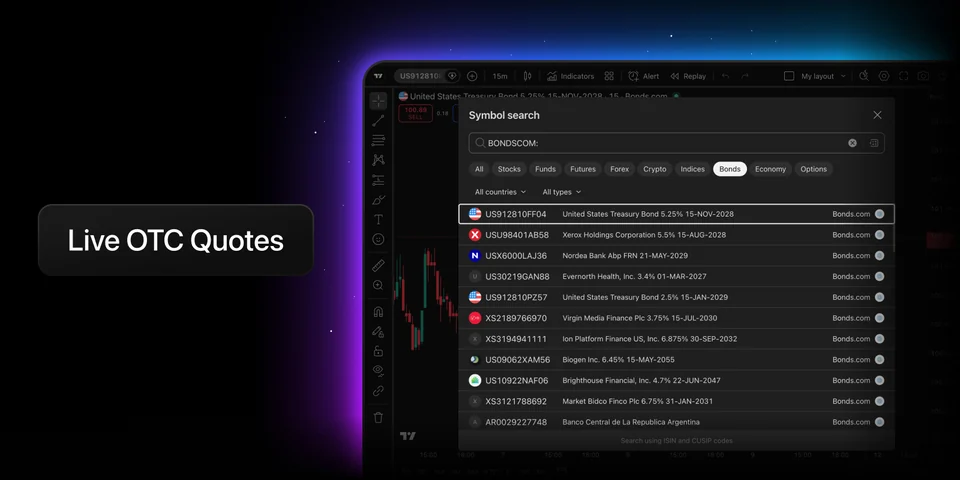
TradingView announced live bond quotes from Bonds.com on 14 October. The feed adds bid, ask, midpoint and calculated yield for government and corporate bonds. Find it by choosing Bonds in symbol search and entering BONDSCOM:.
Check both the security and its source
A bond is a debt security, but its name alone is not enough to identify the precise instrument you are studying. An ISIN, short for International Securities Identification Number, is a 12-character identifier for a specific security. TradingView supports searching by this identifier, which is useful when the local ticker is unfamiliar or similar names appear in a results list. The identifier answers which security you have found; it does not identify who supplied the displayed price.
That second question belongs to the Source field. TradingView’s documentation says it can identify an exchange, a trading venue or a data provider, including an aggregator. The distinction matters when comparing quotations: selecting another source changes the origin of the pricing information, rather than necessarily changing the underlying security. The Bond Screener includes both a Source column and a Source filter. Keeping that column visible makes the comparison easier to follow.
Keep multiple listings together
The same bond can appear under several symbols because it is listed in more than one place. In the screener’s settings, Group bonds by ISIN puts listings for the same issue into one group. The table shows a primary symbol, with the other listings available underneath it. TradingView selects that primary symbol using the most current price information in the group.
This makes the leading row a freshness choice, rather than a promise that it is the source you intended to inspect. Open the group when comparing sources. Turning grouping off displays the securities individually again. For research, this helps separate two questions that a long results list can blur: how many distinct bonds you found, and how many listings exist for those bonds.
Read the space between the two quotes
The bid is the buying side of the quote, while the ask is the selling side. TradingView’s order-price documentation explains the usual relationship from an investor’s perspective: buying meets the ask and selling meets the bid. A midpoint sits between them. It is useful as a reference, but it does not erase the difference between those sides. This general explanation does not establish that a Bonds.com symbol is available to trade through your connected account.
TradingView calculates its bond bid–ask spread percentage by subtracting bid from ask, dividing the result by their average, and multiplying by 100. The percentage expresses the gap relative to the middle of the quote. It is therefore a different measure from the bond’s yield, which describes a return calculation.
For an illustrative quote of 99.5 bid and 100.5 ask, the midpoint is 100 and the spread is 1%. If those prices move to 99.9 and 100.1, the midpoint stays at 100 while the spread falls to 0.2%. The central price is unchanged, yet the two sides are closer together. These are hypothetical price units used to explain the calculation, not observed prices, a yield forecast or a fee schedule.
Build a comparison you can revisit
The Bond Screener lets you narrow the list by maturity, issuer, coupon and issue currency. Maturity is the repayment date; the coupon describes the bond’s interest payments. These fields help define a more specific comparison than simply ranking every available instrument by one attractive number. A government bond and a company bond can appear in the same tool while representing different borrowers and payment terms.
Once you have chosen filters, save and name the screen so you can return to that selection. The screen menu also provides CSV export, producing a table for further analysis. Display settings control which descriptive fields appear and how often the table refreshes. A saved screen preserves a research setup; it does not mean that every number will remain the same when you reopen it.
What the announcement leaves open
The announcement specifies no feed price, minimum plan or country access list. Seeing a quote does not establish eligibility to trade.

30-day trial + $15 first-plan coupon
New-user eligibility applies. No code needed; check renewal pricing and coupon terms.
Conditions
The partner link has no expiry. Campaign dates, benefits and eligibility are separate and may change. Check the provider’s current terms before signing up.
We may earn a commission, at no extra cost to you.