Phantom announced EU card funding on 22 September 2026. Exchange.news published this roundup on 26 October 2026 after reading Phantom’s help centre that day; limits, providers and supported cards may have changed since.

PhantomPartner offer
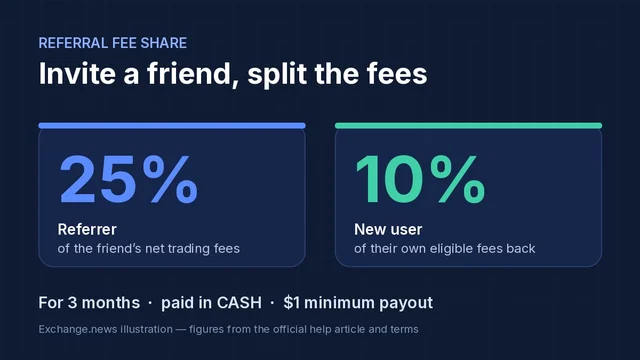
10% of trading fees back for 3 months
Phantom referral code: findcodes — sign up with this code to get 10% of trading fees back for 3 months.
Affiliate link. We may earn a commission, at no extra cost to you.
At a glance
- What changed
- Phantom lets EU users fund the wallet with Apple Pay, Google Pay or a debit card, alongside instant Crossmint token buys and stablecoin deposits.
- Who it affects
- Phantom mobile users, especially in the EU, who want to move money into the wallet without going through an exchange.
- When
- EU card funding was announced on Phantom’s official X account on 22 September 2026; the other routes are described in Phantom’s current help centre.
Card funding opens to the EU
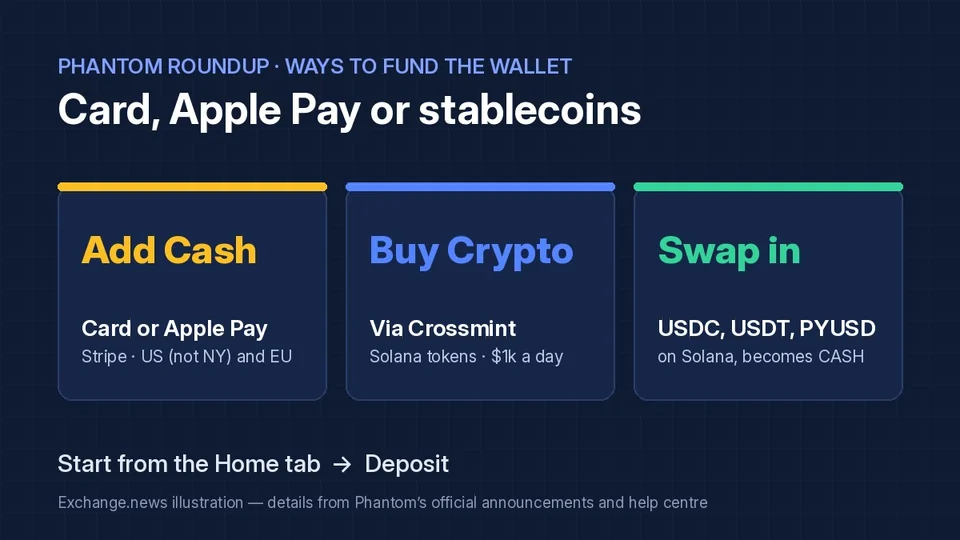
Phantom used its official X account on 22 September 2026 to tell European users “EU? You’re in.” The post said they can now buy crypto with Apple Pay, Google Pay or a debit card straight from Phantom, without going through an exchange, by tapping Add Cash.
Phantom’s help centre fills in the detail. In the EU and the US, except New York, Add Cash runs through Stripe inside the app, and users first verify their identity. In other regions the same button routes to Meld or providers such as MoonPay, which may set their own minimums. Depending on the provider, the user receives CASH directly or buys USDC that Phantom converts into CASH once the transaction confirms.
The steps are short: on the Home tab tap Deposit, then Add Cash, enter an amount, review the payment method, provider and fees, and confirm. Phantom notes that Visa tends to work best with Stripe, Mastercard and American Express may be declined by the bank, and Discover and the US Apple Cash debit card are not supported. Stripe limits depend on payment method, verification level, account history, location and Stripe’s own risk checks; some run on a rolling 7-day window, and Phantom Support cannot raise them.
Instant buys through Crossmint
A second route skips the Cash balance altogether. Under Deposit, then Buy Crypto, Phantom lists eligible trending Solana tokens that can be bought with Apple Pay or Google Pay through Crossmint. Phantom says purchases are capped at $1,000 worth of tokens per day and need no identity verification. The tokens go straight to the wallet.
Only tokens shown in that list qualify, and the first purchase asks the user to accept Crossmint’s terms. Phantom says the Deposit button is rolling out gradually, so some users on older app versions may not see it yet.
Swapping stablecoins into Cash
Users who already hold stablecoins can top up Cash without a card. Phantom’s help centre says USDC, USDT or PYUSD on Solana can be sent to the deposit address of the Cash account, found under Deposit, then Receive Crypto in a new wallet, or via the QR icon on the Cash tab in a funded one. Phantom then swaps the deposit into CASH automatically.
The network matters: the transfer must use Solana, and Phantom warns not to send any other token to that address. CASH already sitting in the main wallet balance should be moved with the slider on the Cash tab rather than sent to the Cash address.
Where USDC fits
USDC runs through two of these routes: some card providers deliver USDC that Phantom turns into CASH, and USDC on Solana is one of the three stablecoins accepted for Cash deposits. For readers choosing a self-custody home for USDC, Phantom itself is one option. Coinbase Wallet, the Base app, is another; its offer is in the closing box below. Whichever wallet sends the funds, match the network to what the receiving address supports.

BaseDiscount code
10% off eligible swap fees
Base referral code: 2ZTS468P — sign up with this code to get 10% off eligible swap fees.
Affiliate link. We may earn a commission, at no extra cost to you.
Conditions
New wallets only; enter the code during onboarding. Same-chain swaps and regional eligibility rules apply.
The code and partner link have no expiry. Campaign dates, benefits and eligibility are separate and may change. Check the provider’s current terms before signing up.