
SafePalPartner offer
Air-gapped self-custody with SafePal S1
SafePal referral code: getsafepal. Sign up with this code to get air-gapped self-custody with SafePal S1.
Affiliate link. We may earn a commission, at no extra cost to you.
At a glance
- What changed
- Two new tools for Aster perpetuals in the SafePal app: take-profit and stop-loss orders, and adding or removing margin on an open position.
- Who it affects
- SafePal app users who trade Aster perpetual futures from inside the wallet.
- When
- Announced on 5 November 2026 at 08:00 UTC (09:00 in Amsterdam). Available after updating the SafePal app.
What SafePal announced
SafePal posted on its official X account on 5 November 2026 at 08:00 UTC (09:00 in Amsterdam) that trading Aster inside the SafePal app has two new features. The first is take-profit and stop-loss orders. The second is the option to adjust the margin of a position that is already open. To use them, SafePal says you need to update the SafePal app.
Aster is a decentralised perpetual futures exchange, and SafePal lets its app users trade Aster's markets from inside the wallet. Until now the post's wording suggests those two risk tools were missing there; SafePal describes them as new.
How the new screens work
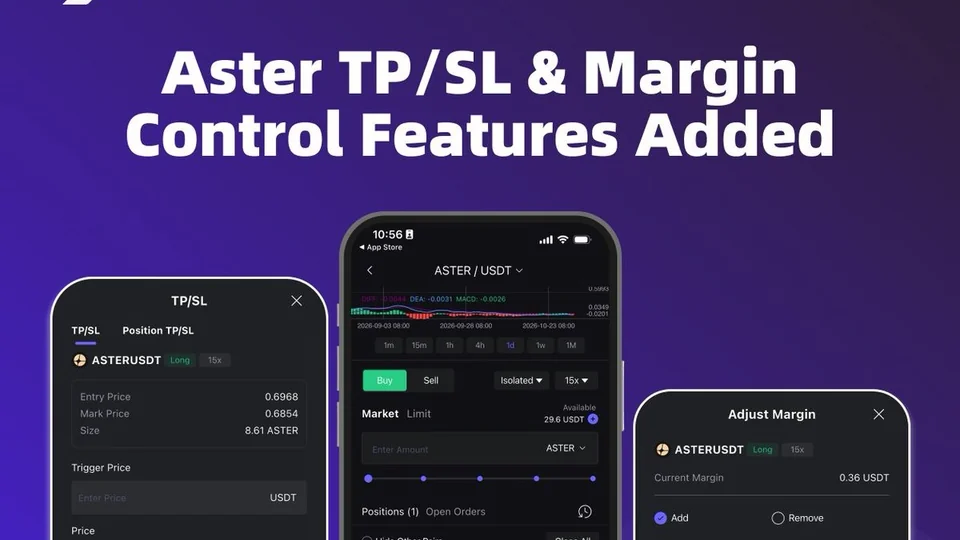
The official image walks through an ASTER/USDT long position. On the position card, a TP/SL button sits next to Close. It opens a sheet with two tabs, TP/SL and Position TP/SL, showing the entry price, the mark price and the position size, with a field for the trigger price, a price setting (Market in the example) and an estimated profit or loss before you confirm.
The margin figure on an isolated-margin position now has its own control. Tapping it opens Adjust Margin, where you choose Add or Remove, enter an amount in USDT and see the amount you can add and the new liquidation price before confirming. Adding margin moves the liquidation price further away; removing it moves it closer.
What SafePal has not said
The post does not list which Aster markets get the features, whether they also apply to cross-margin positions, or any change to fees. The prices, sizes and 15x leverage in the screenshots are demo values, not a recommendation. Check the details in the updated app before placing an order.
Our take
A stop-loss is the basic safety net for any leveraged trade, so its absence was a real gap for people trading perps from a wallet. Set one when you open the position rather than after the market moves, and remember that leverage magnifies losses as much as gains. Update SafePal only through the official app stores or SafePal's own site.

AsterDiscount code
5% back on taker fees for 365 days
Aster referral code: cD05cf. Sign up with this code to get 5% back on taker fees for 365 days.
Affiliate link. We may earn a commission, at no extra cost to you.
Conditions
Taker fees only. The discount relationship lasts 365 days.
The code and partner link have no expiry. Campaign dates, benefits and eligibility are separate and may change. Check the provider’s current terms before signing up.